Microsoft 365 to Google Workspace Migration Services

Microsoft 365 to Google Workspace Migration Services
A well-executed migration is not just a platform switch - it is an opportunity to simplify how your organisation works.
We support UK organisations in moving from Microsoft 365 to Google Workspace, replacing Outlook, SharePoint, OneDrive and Teams with a more cohesive, cloud-native stack. Our approach combines upfront technical assessment with structured delivery, ensuring that what you end up with is not just a migrated environment, but a better one.
Why Organisations Are Moving Away from Microsoft 365
Most Microsoft environments evolve organically rather than by design. Over time, this typically leads to fragmented SharePoint structures, duplicated files across OneDrive and Teams, and permission models that are difficult to audit or confidently change.
Google Workspace takes a different approach. Collaboration is inherently real-time, file ownership is clearer, and sharing models are more transparent. For many organisations, this results in a measurable reduction in operational friction - fewer duplicated documents, fewer access issues, and less time spent managing the platform itself.
There is also a technical simplification. With no dependency on thick clients, local sync complexity, or layered admin tooling, Workspace environments tend to be easier to support and scale, particularly for distributed teams.

Migration Assessment & Technical Discovery
Before recommending any migration, we carry out a detailed assessment of your current Microsoft 365 estate. This is not a surface-level review - it is a structured technical discovery designed to uncover risk, complexity, and opportunities to improve.
We typically analyse:
- Exchange Online configuration, including mailbox sizes, shared mailboxes, forwarding rules, and transport policies
- SharePoint site architecture, document libraries, metadata usage, and inheritance of permissions
- OneDrive usage patterns, sync behaviour, and external sharing exposure
- Microsoft Teams structure, including how files are actually being stored across SharePoint backends
- Azure AD configuration, identity sources, SSO flows, and conditional access policies
- Power Automate flows, integrations, and any business-critical dependencies
From this, we produce a migration strategy grounded in reality. That includes what can be moved cleanly, what needs restructuring, and what should not be migrated at all. In many cases, the biggest gains come from what you leave behind.
Schedule a Technical Assessment
Migration Delivery: Structured, Not Lift-and-Shift
A successful migration is not about copying data from A to B. Microsoft and Google have fundamentally different models for storage, identity, and collaboration, and treating them as equivalent leads to poor outcomes.
Email migration from Exchange Online to Gmail is relatively mature, but still requires careful handling of calendars, recurring events, shared mailbox access, and delegated permissions. We manage this using staged or batch migration tooling, with coexistence where required to avoid disruption.
File migration is where most complexity sits. SharePoint and OneDrive structures rarely translate cleanly into Google Drive. We map content into Shared Drives based on how teams actually work, redesign permission models where inheritance has become convoluted, and address issues such as deep folder hierarchies, invalid file paths, and broken links.
For Teams, there is no direct like-for-like migration of chat history into Google Chat. Instead, we work with you to define what matters - files, structure, and ongoing collaboration - and design a transition that reflects how Workspace operates rather than forcing a Microsoft paradigm into it.
Identity and access are configured to align with your existing architecture. Whether you are using Azure AD as an identity provider or moving toward Google-native identity, we set up SSO, enforce security policies, and ensure a controlled domain cutover, including MX, SPF, DKIM, and DMARC configuration.
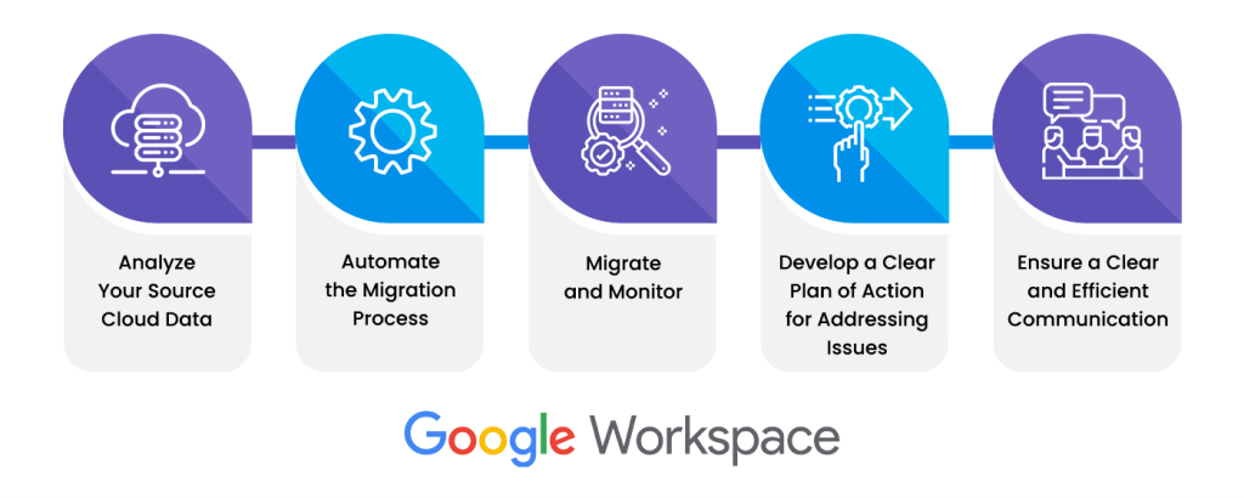
Migration Delivery: Structured, Not Lift-and-Shift
A successful migration is not about copying data from A to B. Microsoft and Google have fundamentally different models for storage, identity, and collaboration, and treating them as equivalent leads to poor outcomes.
Email migration from Exchange Online to Gmail is relatively mature, but still requires careful handling of calendars, recurring events, shared mailbox access, and delegated permissions. We manage this using staged or batch migration tooling, with coexistence where required to avoid disruption.
File migration is where most complexity sits. SharePoint and OneDrive structures rarely translate cleanly into Google Drive. We map content into Shared Drives based on how teams actually work, redesign permission models where inheritance has become convoluted, and address issues such as deep folder hierarchies, invalid file paths, and broken links.
For Teams, there is no direct like-for-like migration of chat history into Google Chat. Instead, we work with you to define what matters - files, structure, and ongoing collaboration - and design a transition that reflects how Workspace operates rather than forcing a Microsoft paradigm into it.
Identity and access are configured to align with your existing architecture. Whether you are using Azure AD as an identity provider or moving toward Google-native identity, we set up SSO, enforce security policies, and ensure a controlled domain cutover, including MX, SPF, DKIM, and DMARC configuration.
Data Integrity, Security, and Control
We place a strong emphasis on validation and control throughout the migration process. This includes pre-migration sampling, in-flight monitoring, and post-migration verification to ensure completeness and accuracy.
Security is maintained end-to-end. We review existing permission exposure, rationalise access during migration, and ensure that the resulting Workspace environment aligns with best practice around least privilege and external sharing.
Adoption and Operational Readiness
Even a technically perfect migration will fail if users do not adapt to the new environment.
We focus on practical adoption - how people actually work day to day. That means structured onboarding sessions, targeted training based on roles, and clear guidance on how to replace familiar Microsoft workflows with Google-native equivalents.
For internal IT teams, we provide admin-level enablement so that you are not dependent on external support to manage users, policies, and data going forward.
Why This Approach Works
We combine deep familiarity with Microsoft 365’s underlying structure with a clear understanding of how Google Workspace is meant to be used. That allows us to bridge the gap properly, rather than forcing a superficial migration.
- We prioritise data structure and permission clarity over speed of transfer
- We design the target environment before moving data into it
- We avoid unnecessary migration of redundant or low-value content
- We align technical decisions with how your teams actually collaborate
The result is an environment that is cleaner, more usable, and easier to manage from day one.
Start With a Technical Assessment
If you are considering a move to Google Workspace, the first step is understanding the shape of your current environment and what a migration would really involve.
We provide a clear, technically grounded assessment and a migration plan you can trust - whether you proceed immediately or not.
Contact Us