BYOD Is Here Whether You Like It or Not - Here's How to Make It Work Securely
Let me be honest about where I started on BYOD: I didn't like it.
My instinct, when personal devices started appearing in the workplace, was to treat the whole thing as a security problem to be managed out of existence. Lock everything down. Mandate corporate hardware. Control every endpoint.
That approach lasted about as long as it took to realise that the people ignoring the policy were often our most productive staff. They weren't trying to create security risks - they just wanted to use the device that worked best for them, and our corporate-issued hardware frequently wasn't it.
So the question shifted. Not 'how do we stop BYOD' but 'how do we make it secure enough that it doesn't keep us up at night.' Here's where I've landed.
The actual security problems with BYOD
The risks with personal devices aren't really about the devices themselves - they're about what happens when corporate applications and data end up on hardware you don't control.
You don't know what else is installed on that MacBook. You can't enforce patching. You can't guarantee that the user isn't accessing sensitive systems from a coffee shop on unsecured Wi-Fi. And when someone leaves the organisation, you have no reliable way to ensure that corporate data leaves with them - or rather, doesn't.
The classic response is MDM - mobile device management. Enrol the device, push policies, monitor compliance. It works, up to a point. But it's invasive. Employees resist enrolling personal devices in employer management systems, and frankly I understand why. The moment you enrol someone's personal iPhone in your MDM, you can technically wipe it. That's a significant ask.
Real-world example:
A regional law firm where partners insisted on using their own MacBooks. IT couldn't enforce MDM without triggering partner resistance. The workaround - VPN plus hope - left case management software accessible on machines that were also used for personal browsing, online banking, and everything else. The risk was obvious; the solution wasn't.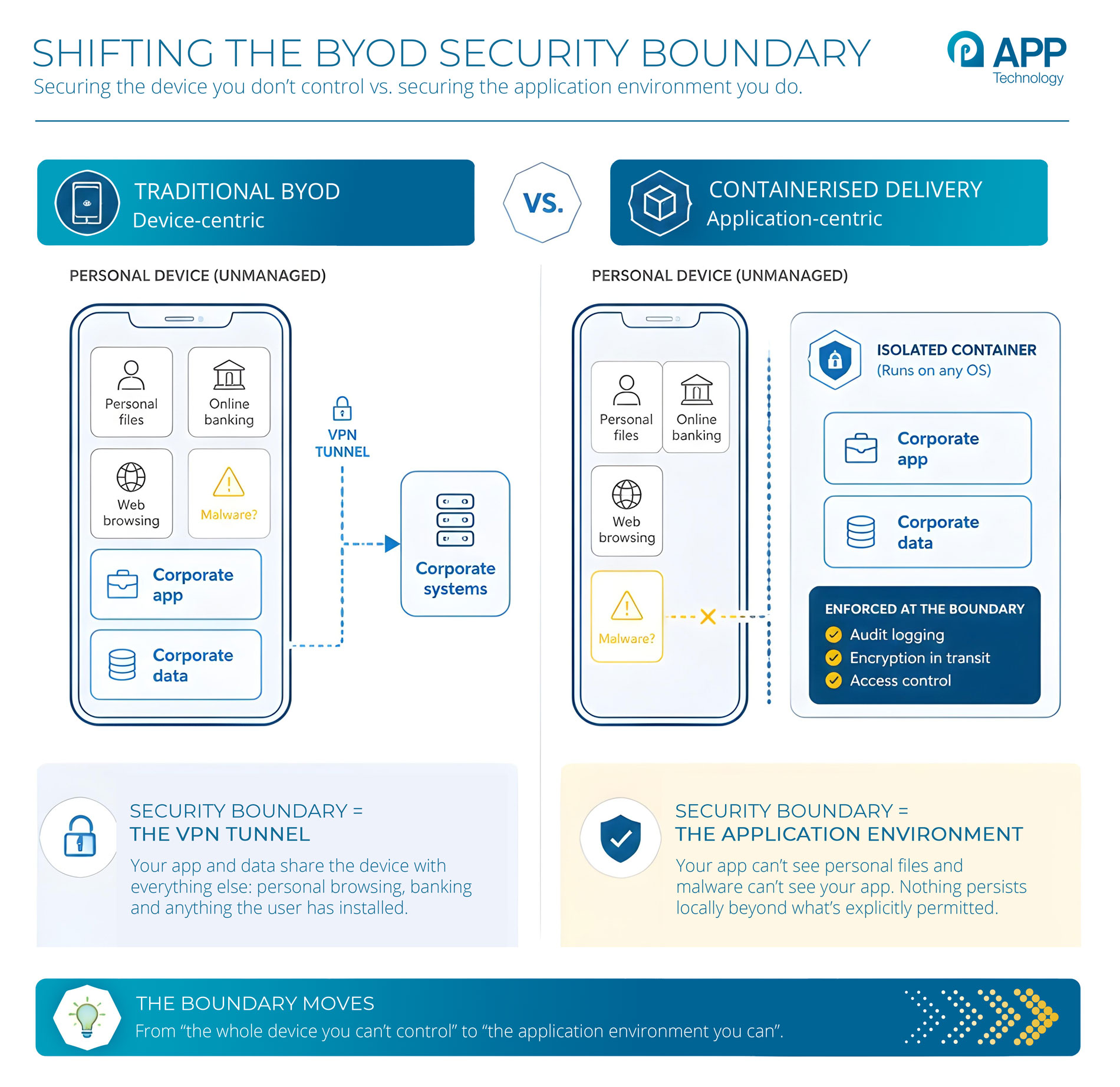
Shifting the security model from device to application
The approach that's changed my thinking is this: stop trying to secure the device and start securing the application environment instead.
If the application runs inside a container that's isolated from the underlying operating system, it doesn't matter much what else is on the device. The application can't see the user's personal files. Personal malware can't see the application's data. The two worlds are separated at the architectural level.
From the user's perspective, they launch the application from their personal device and it works normally. From the IT perspective, the application is running in a controlled, audited environment with defined network access and no ability to persist data locally beyond what's explicitly permitted.
That's a fundamentally different risk profile to traditional BYOD, where the security boundary is effectively the VPN tunnel and hoping the user's device is reasonably clean.
Real-world example:
A Russell Group university supporting 40,000 students and several thousand staff, all expected to use their own devices. The university runs specialist research software that's Windows-only, licensed per-seat, and can't be installed on student machines. Containerised delivery solves three problems at once: cross-platform access from Mac and Linux machines, license control, and keeping research data off personal endpoints.The operating system problem
One thing that doesn't get discussed enough in BYOD conversations is operating system diversity. When you commit to supporting personal devices, you're committing to supporting whatever those people use - and that increasingly means macOS, ChromeOS, and Linux as well as Windows.
Most business applications were built for Windows. Some of them are Windows-only by design, some by default, some just because nobody's ever tested them on anything else. Telling a new employee with a MacBook that they need to buy a Windows laptop to access the payroll system is, at this point, an embarrassing conversation.
Application isolation can largely solve this. The application runs on Windows inside the container; the container is delivered to whatever device the user has. The underlying OS diversity stops being a compatibility problem and becomes an infrastructure detail that IT manages invisibly.
Real-world example:
An NHS trust deploying remote working for clinical admin staff. Staff were using a mix of personal Windows laptops, Macs, and in some cases Chromebooks issued during the pandemic. Their patient administration system was Windows-only and the Trust couldn't afford to replace personal devices across the board. Containerised delivery meant the application ran consistently on all three platforms, without the Trust needing to manage the underlying hardware.What about compliance?
BYOD and compliance feel like they're in tension, and to some extent they are. GDPR, in particular, creates real questions about personal data sitting on personal devices in ways you can't govern.
The containerised approach helps significantly here. If the application and its data never actually touch the local device - if everything remains within the isolated environment - then the compliance question becomes much simpler. You're not trying to prove that a personal device is compliant; you're demonstrating that the application environment is.
Audit trails, access logging, data encryption in transit - all of these can be enforced at the container level regardless of the endpoint. That's a much more defensible position when someone from your DPA or an external auditor comes asking questions.
The honest trade-off
I won't pretend this solves everything. Users sometimes notice the slight latency of a remote application. Not every legacy application behaves identically inside a container as it does natively. There's an IT overhead to managing the container environment, though in my experience it's considerably lower than the overhead of managing a traditional MDM estate.
But for organisations that have committed to flexible working, or that simply can't avoid the reality of staff using personal devices, application-centric security is the most pragmatic answer I've found. It meets users where they are, keeps security teams out of the business of policing personal hardware, and gives you a defensible compliance story.
That's a better position than most BYOD implementations I've seen.
Talk to a BYOD Security Expert
BYOD isn't going away. The question is whether you're securing the device or the application. If you'd like a second opinion on which approach fits your organisation, just get in touch.