Legacy Software Isn't Going Away. Here's How to Stop It Being Your Biggest Security Problem.
Every organisation I've worked with has the same conversation eventually. Someone in a board meeting or a risk committee asks about a particular system - usually one that's been running for fifteen years and touches something critical - and the room goes quiet. Everyone knows it's a problem. Nobody has a clean answer.
The system is out of support. The vendor might not exist anymore. Replacing it would take years and cost a fortune. But it's sitting there, on your network, doing its job, and creating a security exposure that keeps the CISO awake at night.
I've been that CISO. And after dealing with this problem across several different organisations, I want to share what actually works - because the standard answers ('replace it' or 'accept the risk') are usually both impractical and dishonest.
Why legacy systems are uniquely dangerous right now
Legacy software has always been a security liability. What's changed is the regulatory environment around it. NIS2, DORA, Cyber Essentials Plus - these frameworks don't have a comfortable 'yes but it's legacy' exception. They expect you to demonstrate that systems accessing your network meet current security standards. An end-of-life application that hasn't seen a security patch in three years is going to fail that test.
At the same time, threat actors have gotten better at targeting exactly this kind of exposure. Unpatched, isolated legacy systems with known vulnerabilities are a documented attack vector. The attackers know these systems exist in most organisations; they know what the vulnerabilities are; they know that security teams often can't patch them without breaking functionality.
So the problem has got worse even for organisations that haven't changed anything. The threat has moved to them.
Real-world example:
A mid-sized manufacturer running production control software on Windows XP embedded - the system ran on the line itself, not a separate server. Windows XP has been end-of-life since 2014. The software vendor's position: we don't support upgrades, the hardware won't run anything newer, and modification to the system voids the warranty. The manufacturer's position: we can't stop production for a full line replacement. This is a real situation, and it's far more common than most people admit.The three options - and why two of them usually don't work
When you're facing a legacy system problem, there are three paths. Replace it. Accept the risk. Or contain it.
Replacement is the right answer in the long run. But 'the long run' is doing a lot of work in that sentence. Full system replacements take years to plan and execute, cost significantly more than initially budgeted, and carry real operational risk during transition. I've seen organisations spend three years on a replacement project only to discover that the new system doesn't handle edge cases that the old one had been quietly managing for decades. In the meantime, the legacy system keeps running.
Risk acceptance is what most organisations end up doing by default, usually without explicitly framing it as a decision. The system stays on the network. Security is aware. Everyone hopes nothing happens. This is not a strategy; it's an absence of one.
Containment - running the application inside a secure, isolated environment - is the option that often gets overlooked, and it's the one I want to spend the most time on.
What containment actually looks like
Containerised application delivery works by creating an isolation layer between the legacy application and everything else - the host operating system, the network, other applications. The legacy software runs inside the container and behaves exactly as it always has. But from a security perspective, it's in a walled garden.
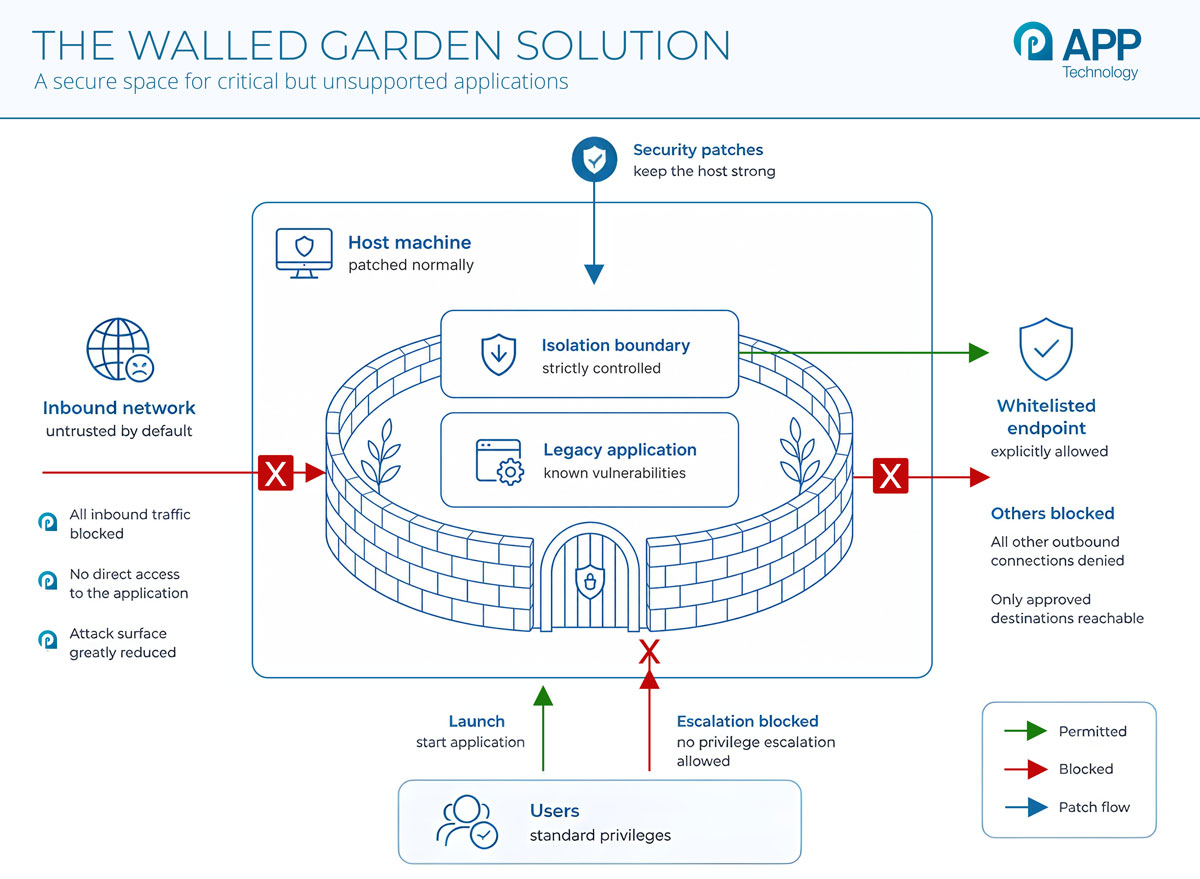
Inbound network access is blocked by default. The application can't initiate outbound connections except to explicitly whitelisted endpoints. Users can launch the application but can't escalate privileges. The host machine continues receiving normal security patches without any risk of breaking the application inside the container.
The practical effect is that you've taken a system with known, unpatched vulnerabilities and significantly reduced the exploitability of those vulnerabilities. The vulnerabilities still exist - you haven't fixed them - but the attack surface has shrunk dramatically.
Real-world example:
A private hospital group running diagnostics software tied to imaging equipment. The software is certified to run on Windows 7. The certification process for medical devices takes 18-24 months, so even when the vendor produces a Windows 11-compatible version, the hospital can't deploy it immediately. Containerised delivery lets the hospital run the certified Windows 7 application on modern Windows 11 hardware, maintaining the certification baseline while eliminating the hardware dependency on end-of-life machines.The hardware dependency problem
One thing that doesn't come up enough in these conversations is hardware. Many legacy software problems are actually legacy hardware problems in disguise. The application itself might theoretically be capable of running on modern hardware, but it's never been tested there, or the vendor has tied licensing to specific hardware identifiers, or it requires a physical interface that modern machines don't have.
As that hardware ages, the organisation faces a double-edged problem. The software is unsupported. The hardware it runs on is also becoming unsupported and increasingly difficult to maintain. When the hardware fails - and it will - you have an emergency replacement situation rather than a planned migration.
Containerisation addresses this by decoupling the application from the hardware entirely. Once the application is running inside a container, it can be migrated to new hardware without touching the application. The transition from aging servers to modern infrastructure becomes a straightforward infrastructure exercise rather than an application compatibility project.
Real-world example:
A university engineering department running simulation software licensed to specific server hardware. The servers date from 2011. When one failed, IT faced an urgent choice: source equivalent 12-year-old hardware (expensive, unreliable, unsupportable) or lose access to the simulation software mid-semester. Containerised deployment would have allowed the software to run on any compatible server, making hardware refresh a routine operation rather than a crisis.The compliance argument
I mentioned NIS2 and Cyber Essentials Plus earlier. Let me be specific about what these frameworks actually require and how containerisation addresses them.
Cyber Essentials Plus requires, among other things: patched software, controlled network access, malware protection, and secure configuration. A legacy application running natively on a Windows 11 machine is likely failing at least the first of these. The same application running inside a managed container, where the container itself is patched and the application's network access is controlled, has a much stronger compliance story.
NIS2 adds requirements around incident detection, logging, and the ability to demonstrate active risk management. Container environments generate audit logs by default. Access is controlled and recorded. When something goes wrong - or when an auditor asks - you have evidence of active management rather than passive acceptance.
I'm not going to claim containerisation makes legacy software fully compliant overnight. But it transforms a 'we know this is a problem and haven't addressed it' situation into a 'we've implemented compensating controls and have an active management plan' situation. That's a fundamentally different conversation with an auditor.
The honest cost argument
Legacy application management isn't free. There are deployment costs, licensing, and an ongoing management overhead. But compare that to the alternatives.
Extended support contracts for end-of-life software - where they're even available - are expensive and typically don't address security vulnerabilities; they just mean someone answers the phone when it breaks. Full replacement projects routinely run over budget and over time. Emergency hardware procurement when aging kit fails costs whatever the market demands, because you don't have the luxury of procurement cycles.
Containerised management is a predictable, recurring cost that buys you a security-controlled environment, hardware independence, cross-platform delivery, and time to plan a proper replacement on your terms rather than being forced into it by a crisis.
I've done both. The planned approach is better - not just financially, but operationally. You end up with a better replacement outcome because you've had time to do it properly.
Where to start
If you have legacy systems you're worried about - and most organisations do - the practical starting point is an audit of what you're actually running. What's end-of-life? What can't be patched without breaking functionality? What's tied to aging hardware? What would happen if the hardware failed tomorrow?
That exercise usually produces a list that's longer and more alarming than people expect. But it's also the foundation for a realistic prioritisation conversation: which of these systems are highest risk, which are most amenable to containerised delivery, and where does replacement need to be in the roadmap?
The worst thing you can do is nothing, because the problem gets more expensive and more dangerous every year you leave it. The second worst thing is panicking and trying to replace everything at once, because that usually produces worse outcomes than a phased approach.
Containment, as a bridge strategy, gives you the time and the security posture to do this properly. That's what I'd recommend starting with.
For Legacy Application Security, Talk to Mark
If you're currently running one or more applications that you know are vulnerable and you want them to be managed properly, give me a call. Or read more about Legacy Application Support from APPtechnology.