Microsoft 365 vs Google Workspace: The True Total Cost of Ownership
The per-seat licence price typically represents only a fraction of the total cost of Microsoft 365 or Google Workspace. A genuine comparison covers six areas: licensing and SaaS sprawl, hardware, security and compliance tooling, productivity overlap, migration risk, and AI readiness. Which platform is cheaper depends entirely on your existing application estate.
We've sat in more platform renewal meetings than I can count, and they almost always start the same way. Someone pulls up a spreadsheet comparing Microsoft 365 and Google Workspace per-seat pricing, and within ten minutes the conversation has narrowed to a single number. Which one is cheaper per user, per month.
It's the wrong question. Not because licensing doesn't matter (it does) but because it's a small piece of a much bigger picture, and I've watched organisations make seven figure platform decisions based on it.
Total cost of ownership (TCO) is the full cost of running a platform: licensing, hardware, security tooling, migration and day-to-day operations, not just the subscription price.
After running TCO assessments across enterprise clients for many years, here's what we can share: the licence is rarely where the real money is. It's everywhere else.
Is Google Workspace actually cheaper than Microsoft 365?
Microsoft 365 and Google Workspace look like they're competing on the same axis: productivity suite, email, file storage, collaboration tools. On paper it looks to be a like-for-like swap. In practice, the two ecosystems pull very different threads when you actually migrate.
Microsoft's pricing model tends to bundle desktop applications, and a lot of organisations are still running thick-client software (Excel macros, Access databases, line-of-business tools built around Office integration) that doesn't translate cleanly to a browser-based suite. Google's pricing looks cheaper until you account for what it takes to either replace or wrap those dependencies.
Conversely, organisations that are already largely cloud-native, with younger application estates and less legacy baggage, often find Google genuinely is the lower-cost option once you stop comparing licences and start comparing total platform spend.
The honest answer is that it depends entirely on what's underneath your current estate. Which is exactly why the licence comparison on its own is close to useless.
What I tell clients:
If your procurement team has only compared subscription tiers, you haven't done a cost comparison; you've done a price comparison.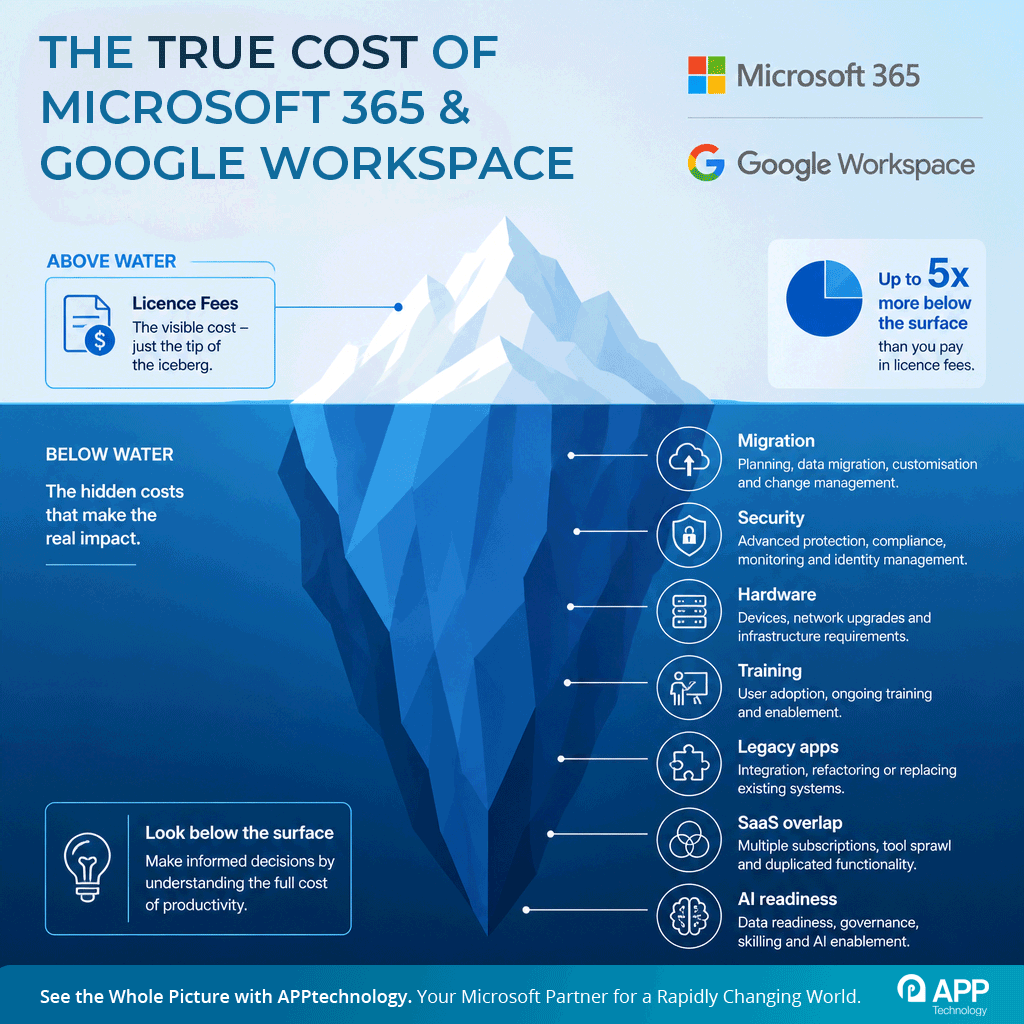
Where do the hidden costs of a platform migration sit?
When we run a full TCO assessment, we're looking in six areas. Every one of these has moved a client's decision in ways the licence price alone never would have.
How the six cost areas compare at a glance:
| Cost area | Microsoft 365 | Google Workspace |
|---|---|---|
| Licensing and SaaS sprawl | Bundled desktop apps; add-ons and unused seats inflate spend | Lower headline price; add-ons and replacement tools can close the gap |
| Hardware and devices | Windows laptop estate with higher procurement and refresh costs | Chromebook option cuts device cost if the estate runs in a browser |
| Security and compliance | Entra, Defender and Purview bundled at higher tiers | Strong native controls; parallel tooling is common during migration |
| Productivity overlap | Teams, SharePoint, Power Automate | Meet, Drive, Apps Script; overlap costs persist until the old stack is decommissioned |
| Migration risk | Lower if staying put; legacy Office dependencies remain supported | Higher where macros, Access and thick-client apps must be replaced |
| AI readiness | Copilot adoption depends on data governance maturity | Gemini adoption depends on data governance maturity |
1. Licensing and SaaS sprawl
Licensing is the most visible cost category, but even here there's more to find than people expect. Add-on subscriptions, duplicate SaaS tools doing the same job as native platform features, and, this one catches almost everyone, unused licensing sitting on the books from headcount changes nobody's reconciled. I've seen six-figure annual spend on licences nobody was using.
2. Hardware and device estate
Hardware is where the two platforms genuinely diverge. A move towards Google Workspace often opens up a Chromebook conversation, and Chromebooks are materially cheaper to procure, manage, and refresh than Windows laptops. But that only pays off if your application estate can actually run in a browser. If it can't, you've added a second device class to manage rather than simplifying anything. Refresh cycles, BYOD policy, and mobile device costs all need to be modelled here, not assumed.
3. Security and compliance tooling
Identity management, endpoint security, DLP, SIEM and SOC tooling, compliance platforms: these rarely get reassessed during a platform migration, and they should. Microsoft's security stack and Google's security stack don't map onto each other one-for-one, and a lot of organisations end up running parallel tooling because nobody revisited the security architecture when the productivity suite changed underneath it. That's duplicated spend that no one wanted and that remains in force after what becomes a partial migration.
4. Productivity and collaboration overlap
Email, file sharing, collaboration, reporting, workflow automation. Both ecosystems do all of this. The cost isn't in the tools themselves, it's in the overlap: organisations running Teams and Slack, SharePoint and Google Drive, Power Automate and Workspace scripting, because migrations rarely fully decommission the old stack. Every month that overlap persists is money spent twice.
5. Migration risk
Migration risk is the cost category leadership teams underestimate most consistently. Data migration complexity, legacy application compatibility, user retraining, and business disruption during the transition all carry real financial weight, and they rarely show up in the original business case. I've seen migration projects double their projected timeline because nobody mapped legacy application dependencies before the project kicked off. That's not a planning failure so much as a planning omission: it's hard to budget for what you haven't discovered yet. Differences in data storage and tagging for instance can dramatically impact a SharePoint or unmanaged data migration.
6. AI readiness
AI readiness is the newest variable and arguably the one boards are most focused on right now. Copilot readiness and Gemini readiness aren't just licensing toggles; they depend on the state of your data governance and the maturity of your security controls. An organisation that migrates platforms without addressing data governance first is going to hit the same wall with AI adoption regardless of which ecosystem they've chosen. Get this wrong and you'll be paying for AI tooling you can't actually deploy safely.
What does this look like in the real world?
A mid-sized professional services firm came to us convinced a move to Google Workspace would cut their platform spend by close to a third, based on licence pricing alone. Once we mapped their actual estate (a substantial Power BI reporting investment, a handful of Access-based internal tools nobody wanted to admit still existed, and a security stack built around Microsoft Entra), the real picture was very different. Migration costs, parallel tooling during transition, and the cost of rebuilding their reporting layer brought the three-year total cost within a few percentage points of simply staying on Microsoft and renegotiating their enterprise agreement.
That doesn't mean Google was the wrong call for them in principle; it means the licence saving they'd been sold on wasn't where the real decision should have been made. They renegotiated instead, and redirected the budget they'd planned for migration into cleaning up the SaaS overlap they'd accumulated over the previous five years. That alone delivered more savings than the platform switch would have.
I've had the opposite conversation too: a logistics business where the existing estate was genuinely light on legacy dependencies, and once we modelled it properly, Google Workspace plus Chromebooks came out significantly ahead on a five-year view, mostly on hardware and device management savings rather than the licence difference itself.
The point isn't that one platform wins. It's that you can't know which one wins for your organisation from seat costs alone.
What should you check before deciding?
If you're heading into a renewal conversation, a migration discussion, or a board question about whether you're overpaying for your current platform, here's what I'd want answered before any decision gets made.
- Have we modelled total cost across licensing, hardware, security tooling, and migration, not just subscription price?
- Do we have a current inventory of SaaS tools, including overlap and unused licences?
- Have we mapped legacy applications and dependencies that won't migrate cleanly to a browser-based suite?
- Does our security and identity stack get reassessed as part of the move, or are we assuming it carries over unchanged?
- Have we costed user retraining and the realistic productivity dip during transition, not just the migration project itself?
- Is our data governance mature enough to support secure AI adoption regardless of which platform we choose?
- If we're considering Chromebooks or a lighter hardware estate, have we confirmed our application estate can actually run there?
- Do we have a genuine five-year total cost model for both platforms, not a one-year licence comparison?
- Has anyone outside procurement (security, IT operations, the application owners) actually validated these numbers?
- If we're not migrating, have we used this exercise to renegotiate our current agreement from a position of real leverage?
That last point matters more than people expect. Even when the answer comes back 'stay where you are,' a proper TCO assessment puts you in a far stronger negotiating position with your existing vendor than a renewal conversation based on list price.
Where should you start?
Trigger points for actually doing this properly: a Microsoft 365 renewal on the horizon, a Google Workspace migration already being discussed informally, M&A integration bringing two platforms together, a board-level cost reduction mandate, or an AI adoption programme that's stalled because nobody's confident in the underlying data governance. Any one of those is reason enough.
Measure twice, cut once: understand what's out there leaving no stone unturned. What you get out of the other side should be a current-state cost baseline, a genuine like-for-like comparison model between the platforms, a security gap analysis, and a roadmap: not a recommendation pulled from a vendor pitch deck, but a number and risk profile you and your board can actually stand behind.
The organisations that get this right aren't the ones that pick the cheaper licence. They're the ones that understand their own estate well enough to know what cheaper actually means once everything else is accounted for. That's a fundamentally different starting point, and in my experience it's the one that holds up eighteen months later when someone asks whether the decision actually paid off.
Frequently asked questions
Is Google Workspace cheaper than Microsoft 365?
Often on licence price, but not necessarily on total cost. Organisations with heavy legacy Office dependencies usually spend the difference (and more) on migration, parallel tooling and rebuilding reporting. Cloud-native estates with little legacy baggage frequently do come out ahead on Google Workspace, particularly when Chromebooks replace Windows laptops.
What does a TCO assessment include?
A full total cost of ownership assessment covers six areas: licensing and SaaS sprawl, hardware and devices, security and compliance tooling, productivity and collaboration overlap, migration risk, and AI readiness. The output is a current-state cost baseline, a like-for-like comparison model, a security gap analysis and a costed roadmap.
Why do platform migrations run over budget?
Most commonly because legacy application dependencies were never mapped before the project started. Excel macros, Access databases and line-of-business integrations that don't translate to a browser-based suite surface mid-project, extending timelines and forcing both platforms to run in parallel.
Do we have to migrate to reduce platform costs?
No. A TCO assessment often shows that renegotiating your existing enterprise agreement and eliminating SaaS overlap and unused licences delivers more savings than switching platforms, and it puts you in a far stronger negotiating position with your current vendor.
Contemplating a move to Google?
The first step is understanding the shape of your current environment and what a migration would really involve. We provide a clear, technically grounded assessment and a migration plan you can trust - whether you proceed immediately or not..Contact us for an informal chat or click the button below to read more about how we help organisations like yours.
Find Out More