Maintaining Endpoint Compliance in an AI World
According to the Centre for Internet Security your highest value investment is to establish and maintain a secure configuration process, and that doing so defends against 500 ATT&CK techniques.
So the question persists, are the devices accessing your systems still configured as securely as you think they are?
You may have already deployed a security baseline via Intune, completed a hardening project or passed your last cyber framework assessment. That gives you a starting point. What happens afterwards determines how much confidence you can place in it today.
Applications change, especially auto update applications with fast development cycles such as browsers. Support teams fix problems to keep the business running. Exceptions are discussed and agreed. Security and compliance policies overlap. A setting that was correct last month may look very different now, or an auto updating application may behave very differently today compared to yesterday. As AI becomes part of everyday work, is it time to ask whether your endpoint compliance can keep up?
What happens after the hardening project finishes?
Picture a familiar situation. An application stops working. An engineer investigates and discovers that relaxing a security setting resolves the issue. The user gets back to work, the ticket closes and everyone moves on.
Perhaps the change was necessary. Perhaps it should become an approved exception. Either way, somebody needs to know it happened and decide what follows. Per device or per group exceptions need to be understood, approved, documented and monitored.
Multiply that situation across a large device estate and you have configuration drift: the gradual movement away from the security settings your organisation approved. Nothing needs to look obviously broken. People can continue working while the estate becomes less consistent and harder to assure.
How compliant is your latest baseline build?
In a one-hour session, we can assess your latest baseline build against your chosen framework’s relevant configuration requirements, demonstrate hardening changes and compare the before-and-after results.
You’ll see where your build aligns, where configuration gaps remain and how automated hardening can help maintain those settings over time.
APPtechnology’s Endpoint Security Hardening service combines technology and specialist support to help organisations apply, verify and maintain approved security configurations across supported Windows environments.
Book your one-hour baseline compliance demonstration with APPtechnology and we will show you how to remove configuration drift from your organisation.
https://www.apptechnology.co.uk/services/endpoint-security-hardening/
Where does AI come into this?
Your organisation is talking about how to use and benefit from AI.
Your employees are exploring how new online tools can improve their work or make their lives easier, often without fully understanding the implications of their actions. Your security team is understandably concerned over what that means for your business data.
AI adoption brings another reason to revisit how devices and applications are controlled. Which tools are approved? How are they accessed? What browser settings, permissions and application configurations support your policies? How will you verify those settings as the environment changes?
A policy telling employees how to use AI needs technical controls behind it. Endpoint hardening forms part of that foundation, alongside identity controls, data protection and governance.
Hardening alone cannot govern what employees share with AI services. It can, however, help maintain the device configurations on which your wider security approach depends. That makes an old problem, keeping settings consistent, relevant to a very current conversation.
CIS asks you to establish and maintain
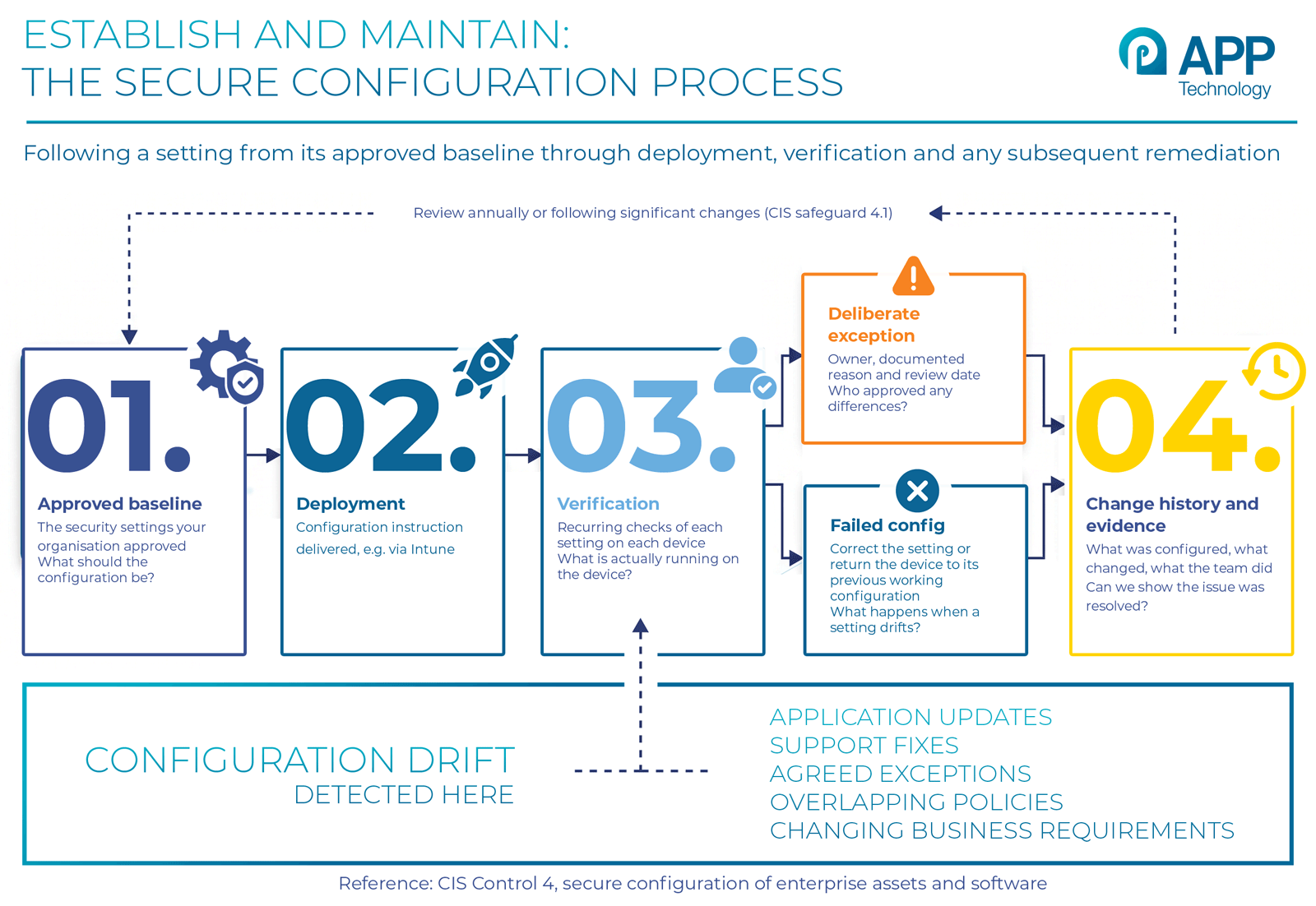
CIS Control 4 provides a useful reference point. It addresses secure configuration across enterprise assets and software. Within it, Safeguard 4.1 calls for a documented secure configuration process, with documentation reviewed annually or following significant changes that could affect the safeguard.
The word maintain deserves attention. Your baseline needs to remain useful after deployment, through application updates, support interventions and changes to business requirements.
CIS Benchmarks help with detailed configuration recommendations for particular technologies. The wider process determines how your organisation approves, applies and maintains its chosen settings.
For an IT leader, that translates into some straightforward questions:
- What should the configuration be?
- What is actually running on the device?
- Who approved any differences?
- What happens when a setting drifts?
- Can we show that the issue was resolved?
If answering those questions requires several spreadsheets and a round of emails, there may be an opportunity to simplify the work.
You have the tools, but do you have the assurance?
Most organisations already have a combination of Intune, Configuration Manager and non-Microsoft endpoint management, security monitoring and assessment tools. The useful question is how effectively those tools work together.
Intune will deliver a configuration instruction, and confirm it has been delivered. What follow up steps does your Security team have to undertake to monitor per setting compliance, and how is drift remediation undertaken on a per device basis?
Can your team follow a setting from its approved baseline through deployment, verification and any subsequent remediation? Can they distinguish a failed configuration from a deliberate exception?
A dashboard showing a problem helps identify the work. Someone still needs to own the next step and verify the outcome. That is where recurring effort builds up: checking devices, investigating differences, correcting settings and assembling evidence before the next review.
Hardening cannot come at the expense of the business
There is a reason teams sometimes hesitate to apply stricter configurations. They need the applications to keep working.
A sensible hardening approach recognises that concern. Start with representative devices and real workflows. Test proposed settings. Understand dependencies. Agree how to reverse a change if its operational impact is unacceptable. In a perfect world you will want to return a device to its previous “working configuration” while an alternative approach is identified that allows business continuity as well as compliance.
Where an exception is necessary, give it an owner, a documented reason and a review date. That gives the business a controlled way to accommodate operational needs without losing sight of the security implications.
What about NIST, DORA and HIPAA?
The same configuration discipline can support other security and compliance programmes. NIST CSF 2.0 includes configuration management within its platform security outcomes. DORA addresses a much wider set of digital operational resilience obligations for financial entities in scope. HIPAA requires administrative, physical and technical safeguards for electronic protected health information held by regulated organisations.
Endpoint hardening can support relevant parts of those programmes, provided the settings and evidence are mapped to the requirements that apply. A device configuration score cannot establish whole-framework compliance. It can help answer an important question within that wider assessment: are the approved technical settings operating as intended?
Spend less time rediscovering the same problems
There is limited value in repeatedly finding the same configuration gaps. A more sustainable approach connects approved baselines with recurring verification, remediation and change history. Automation can help teams maintain supported settings and focus their attention on exceptions and issues that need engineering judgement.
It also makes evidence easier to retrieve when someone asks what was configured, what changed and what the team did about it. Those questions matter throughout the year, whether they come from an auditor, a customer or your own security team.
Book your one-hour baseline compliance demonstration
We will show you the current compliance level of a target device, how we can automate its compliance, and how we manage and remediate drift in your organisation.
Don’t let procrastination put your business at risk—start your migration strategy today.
Further reading
Endpoint Security Hardening
Request a demo
Your Business Was DORA Compliant Yesterday. What About Today?
Infrastructure Consolidation: Creating a Single View Across Complex IT Estates